Jul
12
How can I send a chat message during the Zoom meeting?
Accessing in-meeting chat (desktop)
- While in a meeting, click Chat in the meeting controls.

- This will open the chat on the right. You can type a message into the chat box or click on the drop down next to To: if you want to send a message to a specific person.

- When new chat messages are sent to you or everyone, a preview of the message will appear and Chat will flash orange in your host controls.
Accessing in-meeting chat (mobile)
- While in a meeting, tap the screen to make the screen to make the controls appear.
- Click on Participants.

- At the bottom of the participants list, click on Chat.

- You can type your chat message and click Send or if you want to change who it is being sent to, click the arrow next to Send to: and choose a different person or group of people.
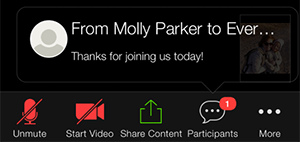
- Incoming chats will be displayed at the bottom of your screen and you can click on Participants then Chat to view them.
Category:
Tech Issues